Async UI Feedback Is a Lifecycle Problem, Not a Spinner Problem
Jul 06, 2026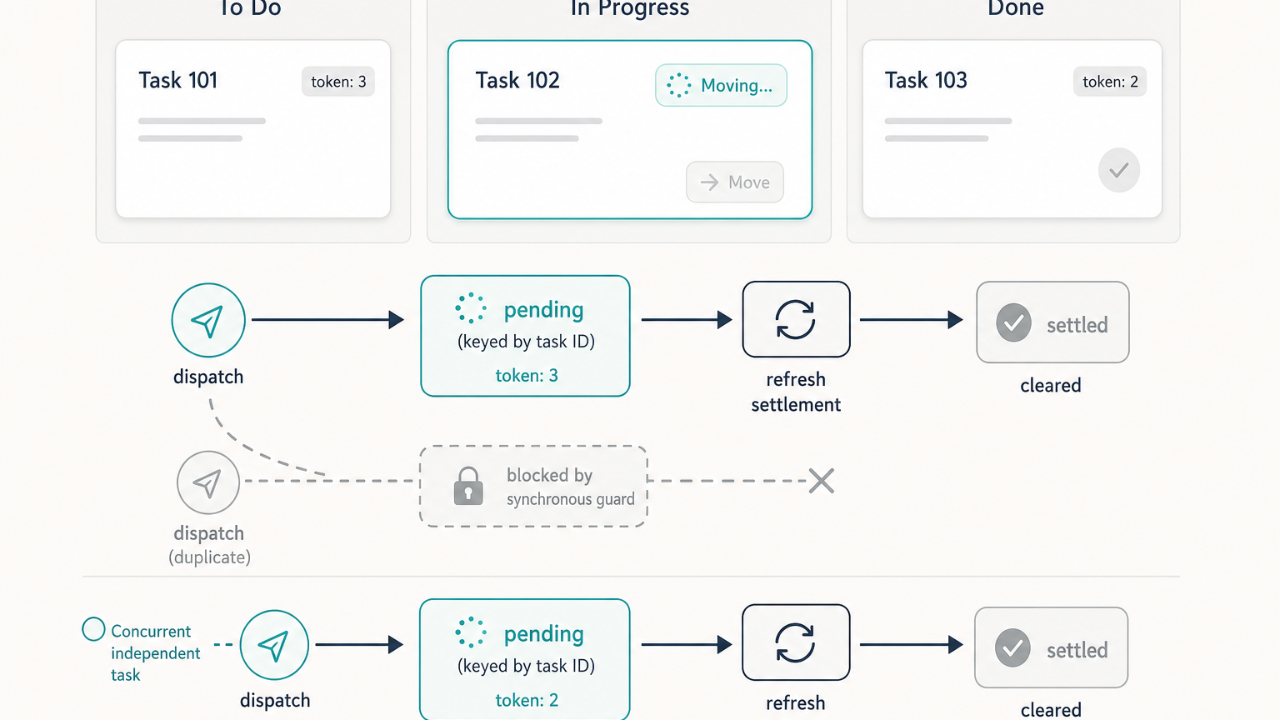
A request to "add a spinner" often hides a distributed-state problem. If the object stays on screen while the action runs, the product needs task-scoped pending feedback, blocked repeat actions, settlement through refreshed data, and a single clear progress indicator—not just a visual loading state tied to a modal or a generic flag.
The problem
The surface symptom was familiar: after a move action, the interface needed to show that work was in progress.
The real problem was larger. After the dialog closed, the task remained visible and actionable while the move continued. The same task could be moved again before the first request settled. The item therefore combined UX feedback, duplicate-dispatch prevention, and asynchronous state ownership.
What looked small at intake contained substantial hidden lifecycle complexity:
- pending state had to be scoped by object ID, not by modal state;
- React state alone was not sufficient for same-tick duplicate prevention;
- pending state needed to persist through both mutation and data refresh settlement;
- concurrent operations on different objects had to remain possible;
- stale completions after context changes or same-ID re-dispatches had to be prevented from clearing newer pending state;
- recursively rendered child cards also needed the pending-state signal.
The tempting fix is cosmetic: add a spinner, disable a button, close the modal. That addresses the visible moment but not the full lifecycle.
What actually happened
The eventual fix was structural rather than cosmetic. It introduced:
- board-owned pending state keyed by task ID;
- a synchronous ref-backed duplicate guard;
- monotonic per-operation tokens;
- awaited refresh settlement;
- token-gated cleanup;
- a single prop path from board to column to card;
- integration coverage that included nested child cards.
The scope remained well controlled. The work did not redesign the database, server actions, realtime subscriptions, refresh coordination, or optimistic movement. The board remained visible and existing refreshed data continued to determine the card's final position.
One implementation defect surfaced during audit: nested child cards used the shared move executor but initially did not receive the pending predicate. A component-level state feature must account for recursive rendering, not only top-level cards. The defect was corrected and covered by a dedicated test.
A separate UX defect surfaced only during human review: both a status label and a move control showed spinners. Automated verification had established technical correctness but had not identified that the duplicated indicator felt visually wrong. The correction stayed narrow—one status spinner, the arrow preserved, the disabled move control retained.
The final outcome, within the defined boundary:
- task-scoped pending feedback;
- one accessible moving indicator;
- same-task duplicate prevention;
- independent concurrent moves;
- awaited refresh settlement;
- stale-completion protection;
- nested-card support;
- preservation of prior modal lifecycle behaviour.
Residual risks remained bounded: tests could not prove device-specific paint timing; only representative executor branches were exercised rather than every multiplexed path; full navigation persistence was intentionally out of scope.
The lesson
For similar work, "show a loading state" should be treated as a lifecycle item whenever the underlying action is asynchronous and the original object remains interactable.
Asynchronous card moves require object-scoped state, not modal-scoped state. Duplicate prevention must use synchronous authority rather than relying only on React rendering. Pending state should remain until the refreshed view settles, not merely until the mutation returns. Recursive component trees must receive state predicates through every render level.
One pending indicator was sufficient; showing both a status spinner and a button spinner created unnecessary visual duplication. Specialized move flows remain separate unless their call paths are verified as shared.
The broader principle
Async UI feedback is not a shallow loading-state change. It is a small distributed-state problem involving action authority, refresh settlement, stale completions, nested rendering, accessibility, and visual hierarchy.
Automated tests can prove that a control is disabled and a status exists. They cannot fully determine whether the resulting UI is visually excessive or confusing. Behavioural correctness, accessibility correctness, and visual coherence are different proof obligations.
When intake language says "add a spinner," investigate the entire async lifecycle: dispatch, visible pending state, blocked repeat action, success settlement, failure recovery, and refresh behaviour. State whether the whole page, the container, or only the affected object should visually change.
How to apply it
Before implementing async UI feedback, define the lifecycle explicitly:
- Dispatch — what triggers the action and what authority guards it?
- Visible pending state — what does the user see, and at what scope?
- Blocked repeat action — how do you prevent duplicate dispatch on the same object?
- Success settlement — when does pending end: mutation return, or refreshed data?
- Failure recovery — what happens if mutation or refresh fails?
- Concurrency — can different objects move independently?
Practical rules:
- Use one primary progress indicator per object unless multiple indicators communicate different information.
- Include recursive, nested, mobile, and alternate render paths in the initial call-path review.
- Test the duplicate guard at the executor level, not only through a disabled button.
- Use monotonic tokens so an older completion cannot clear a newer pending entry.
- Include a targeted human UX check for duplicated loading indicators, icon changes, layout movement, and whether pending feedback feels proportionate.
Proof obligations should distinguish lifecycle behaviour, accessibility, and presentation. Keep human UX review mandatory for user-visible interaction changes even when all automated acceptance criteria pass.
When the object stays on screen while work continues, a spinner is the last detail—not the first design decision.
